
Quoting Process
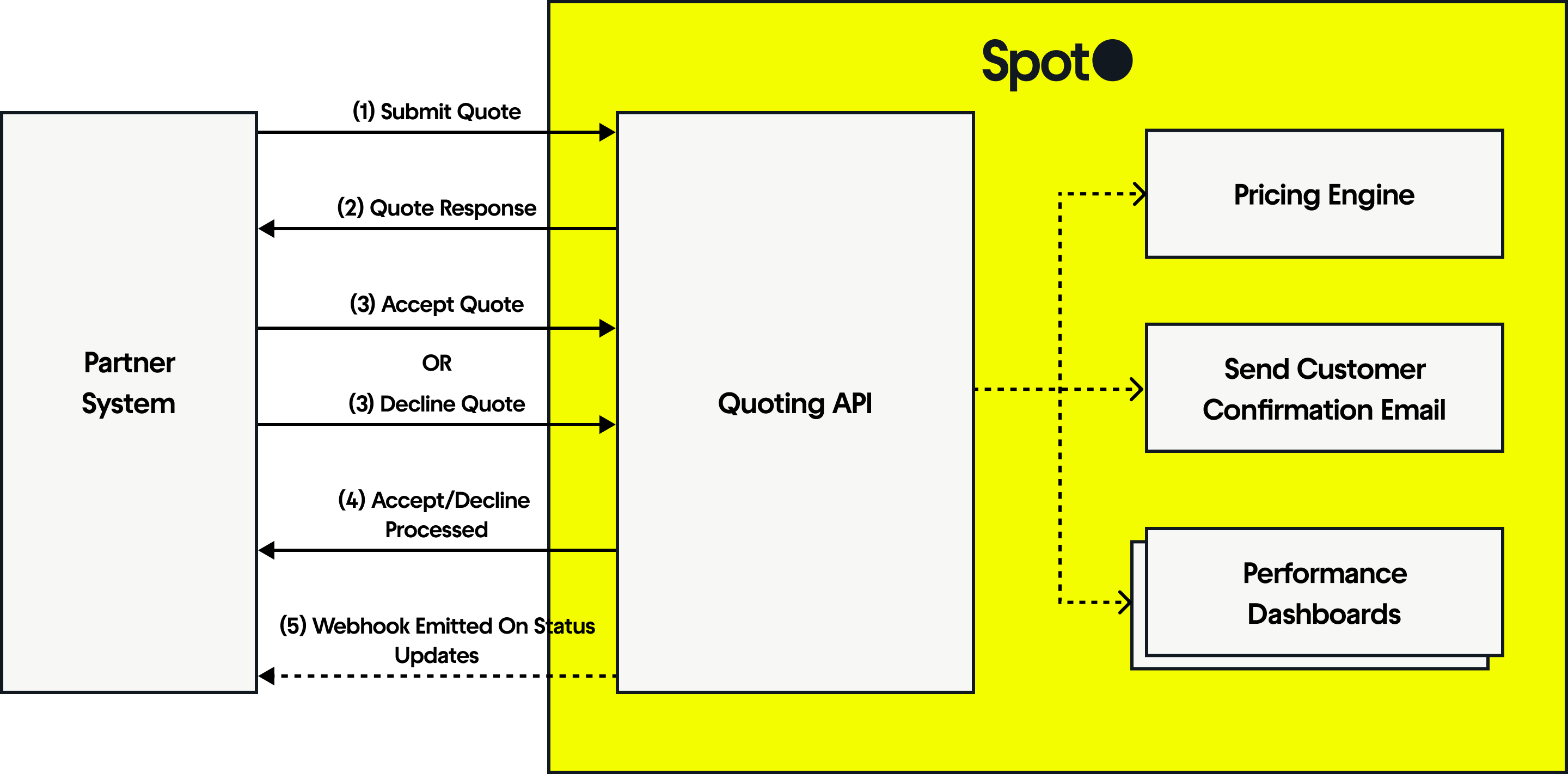
Sequence Diagram Depicting Spot's Quoting Flow
Integration Flow
Integrate Spot's Quote API into your checkout in a few steps:
1. Submit Quote Request
Call the single quote or batch quote endpoint to request a quote.
We'll guide you on the proper values to send for productType, productDuration, and productId. Include your X-Spot-Partner-Id header; authentication is not required for this step.
Security NoteThis operation is safe to execute from either the frontend or backend of your application
2. Handle Quote Response
The API returns a structured response with a quoteId, pricing, policy info, and more. Store the quoteId for the accept/decline step:
- Single-page apps: Store in frontend state (e.g., React context).
- Multi-step flows: Use localStorage, sessionStorage, or backend storage.
- Form-based checkout: Include as a hidden field.
Client Handling:
The API may indicate that no quote is available, which could be due to missing product configurations, coverage limitations, etc. You must handle these responses appropriately to maintain a seamless checkout experience – for example, you may need to hide the Spot offering in your checkout, depending on your implementation.
If a valid quote is returned, display the offer in checkout.
Error Handling:
If NO_MATCHING_QUOTE (202 Accepted) is received, suppress the offer to avoid displaying an unavailable option. Example response:
{
  "data": null,
  "status": "NO_MATCHING_QUOTE"
}
If an error response (400 Bad Request, 500 Internal Server Error) occurs, also suppress the offer to prevent disruptions in checkout. These errors typically indicate missing or invalid data in the request or a temporary issue with the API.
3. Accept or Decline Quote
Once you’ve received the quote, the next step is to handle the customer’s response. The quote should be accepted or declined only after the customer completes their purchase:
- Accept: If the customer was offered Spot and added it to their purchase, call /api/v1/quote/{id}/accept to generate a coverage and an
enrollmentId. - Decline: If the customer was offered Spot, did not add it, but still completed their purchase, call /api/v1/quote/{id}/decline to indicate the quote was not accepted.
Do not decline for abandoned carts, cart modifications, or partial checkout steps — let these quotes remain pending until they naturally expire.
Generate bearer token
Before calling the accept or decline endpoints, ensure that your backend maintains a valid bearer token. The token should be generated and refreshed periodically in the backend so that it does not need to be fetched on demand.
Authenticate with the API to retrieve a bearer token. This token is required for accepting and declining any quotes through the accept a quote or decline a quote endpoints.
Security NoteGenerate and store the Bearer Token strictly in your backend to ensure that sensitive tokens aren’t exposed over the network.
Quote Expiration
Remember to check the expiresAt field in the quote response to ensure the quote is still valid before proceeding with the accepting or declining. Quotes accepted after expiration may be declined, and the quote should be re-retrieved before accepting.
4. Handling Accept/Decline Responses
Accepted quotes return an enrollmentId with status Pending_Acceptance until the enrollment is processed. Malformed or invalid requests (e.g., expired quote, missing data) return 400 - Bad Request with a descriptive error.
5. Listen for Spot Webhook
When a customer redeems their refund benefit, a webhook will be emitted to indicate that the enrollmentStatus has changed from Enrolledto ClaimReceived.
Listening for this status is desirable as it will indicate that the customer will no longer be utilizing the initially purchased product, which can now be added back to your inventory and resold.
See enrollment webhooks for more details.